Wi-Fi, Zigbee, Thread and Matter: A Visual Guide for Indian Homes
Why Smartify recommends Matter-first for new smart homes, how it improves on proprietary Wi-Fi systems, and what Zigbee, Thread and local control mean for India.
By Smartify Team

Smartify recommends a Matter-first smart home for new purchases. Start with Matter-certified devices that meet your needs, rather than making a proprietary, cloud-only Wi-Fi system your default. Matter gives supported devices a common local control language and a standard route into compatible platforms. For us, that flexibility is worth prioritising.
A smart switch can use Wi-Fi and Matter. A Thread sensor can also use Matter. A Zigbee light can appear in a Matter home through a compatible bridge. The choice is not “Matter or Wi-Fi”: it is whether your devices use a shared standard or depend on a vendor-specific integration.
Start with what your home needs: dependable wall switches, sensors that can run on batteries, the apps your family uses, and controls that keep working when broadband fails. Then choose devices and the equipment that connects them.
The short answer: Wi-Fi and Thread provide network connections; Zigbee provides a separate networking and device-communication system; Matter provides a common application language over IP networks, including Wi-Fi, Ethernet and Thread. Matter does not run natively over Zigbee. A compatible bridge can expose supported Zigbee devices to Matter. CSA Matter FAQ, Thread Group, CSA Zigbee.
Research checked on 17 October 2026 by the Smartify Team. This guide is based on standards and platform documentation, not physical product testing. Compatibility depends on the exact products, firmware and ecosystem you choose.
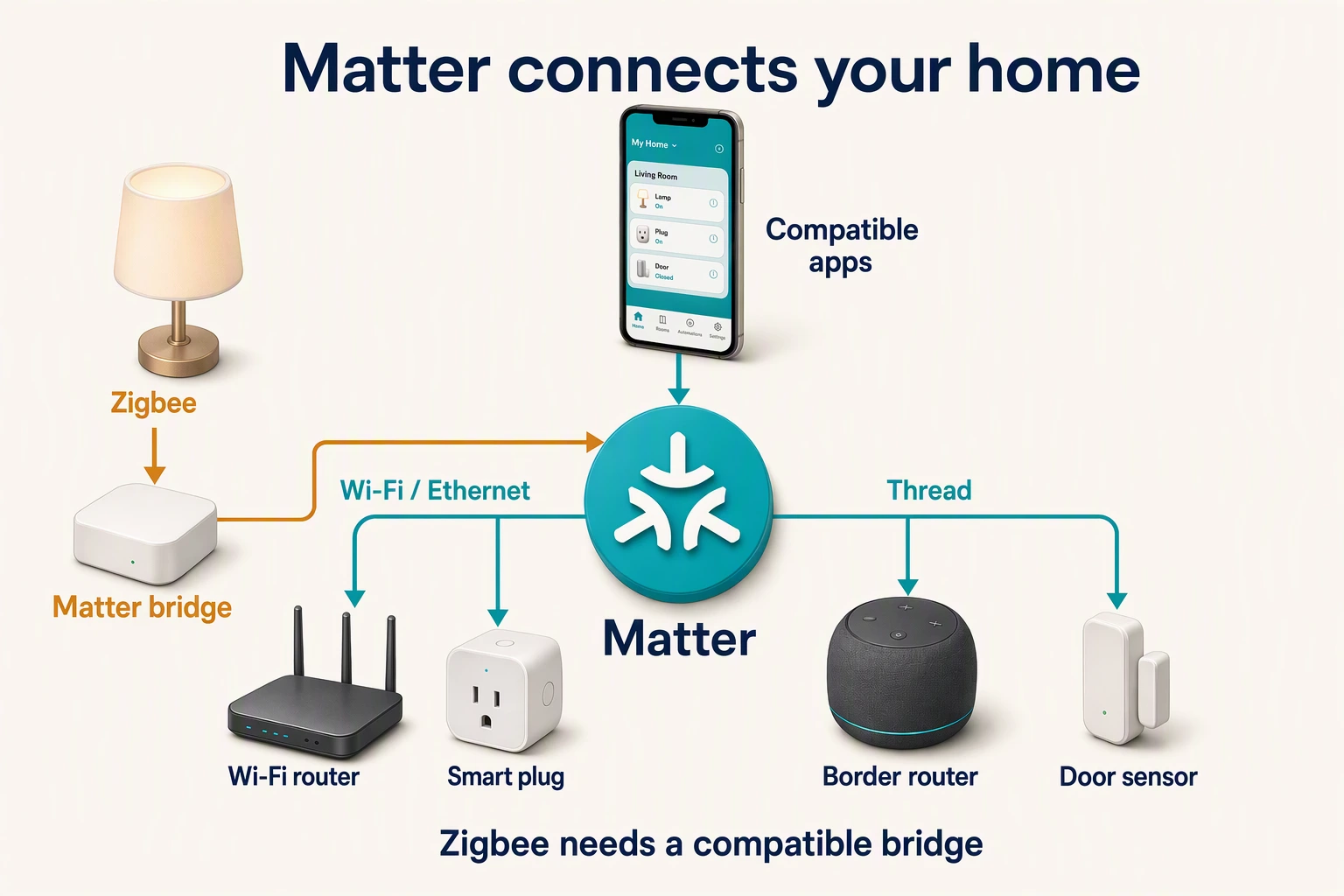
See how the connections fit together
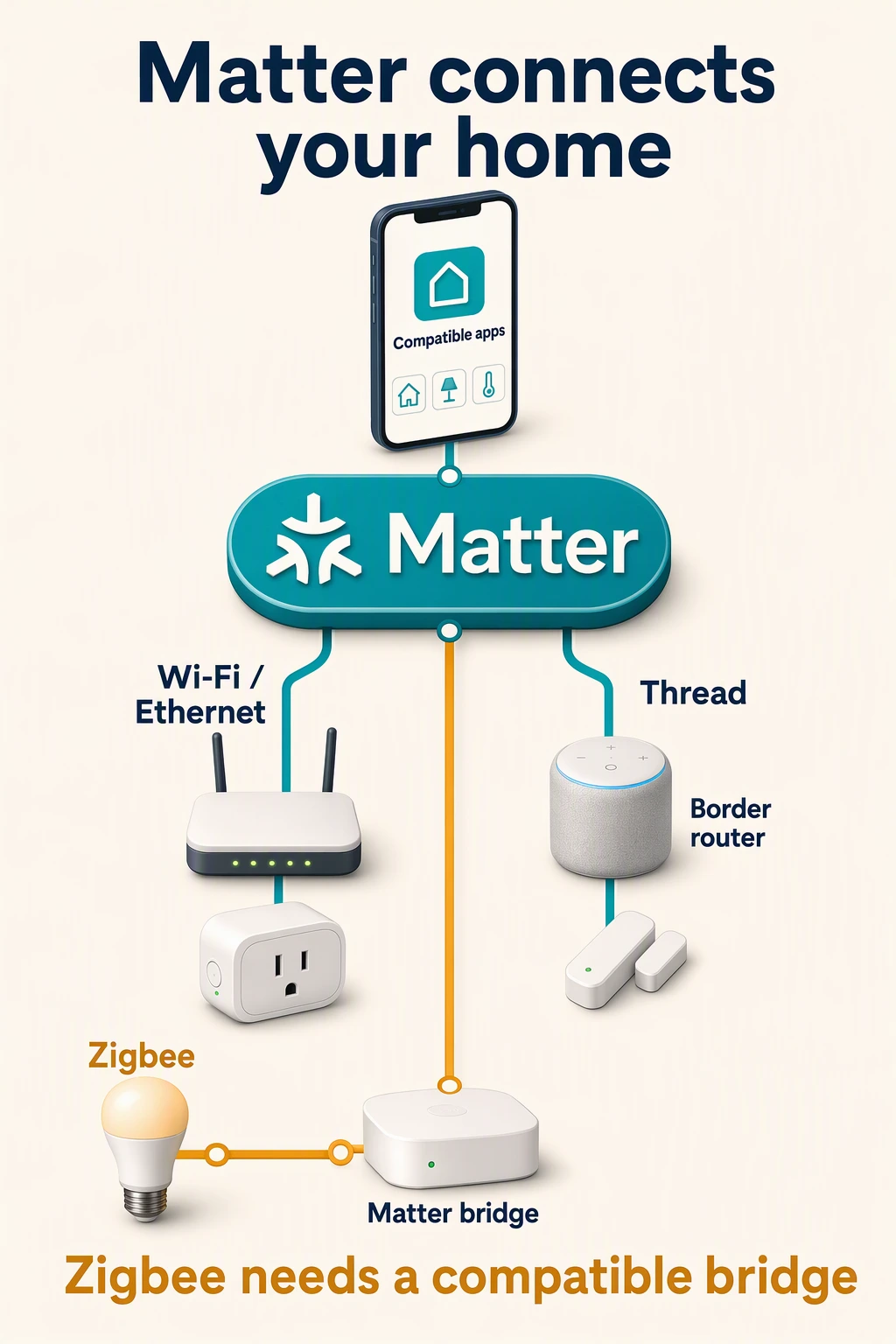
Matter provides the common device language over Wi-Fi, Ethernet and Thread. Zigbee uses its own network and device language; a compatible Matter bridge can expose supported devices and functions. A Thread logo alone does not establish Matter compatibility, and bridging does not turn a Zigbee device into a Thread device.
Architecture: CSA Matter FAQ and Thread Group.
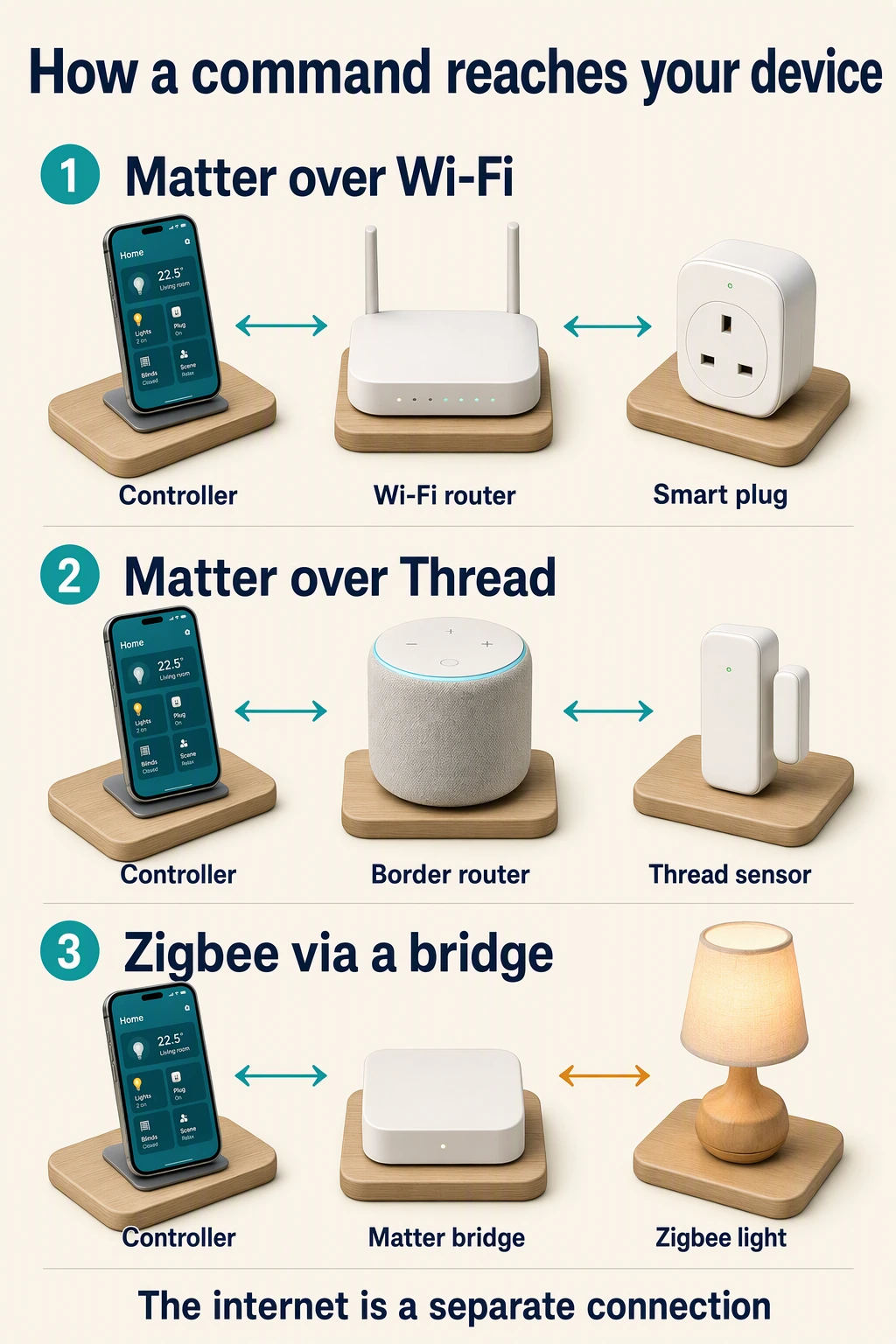
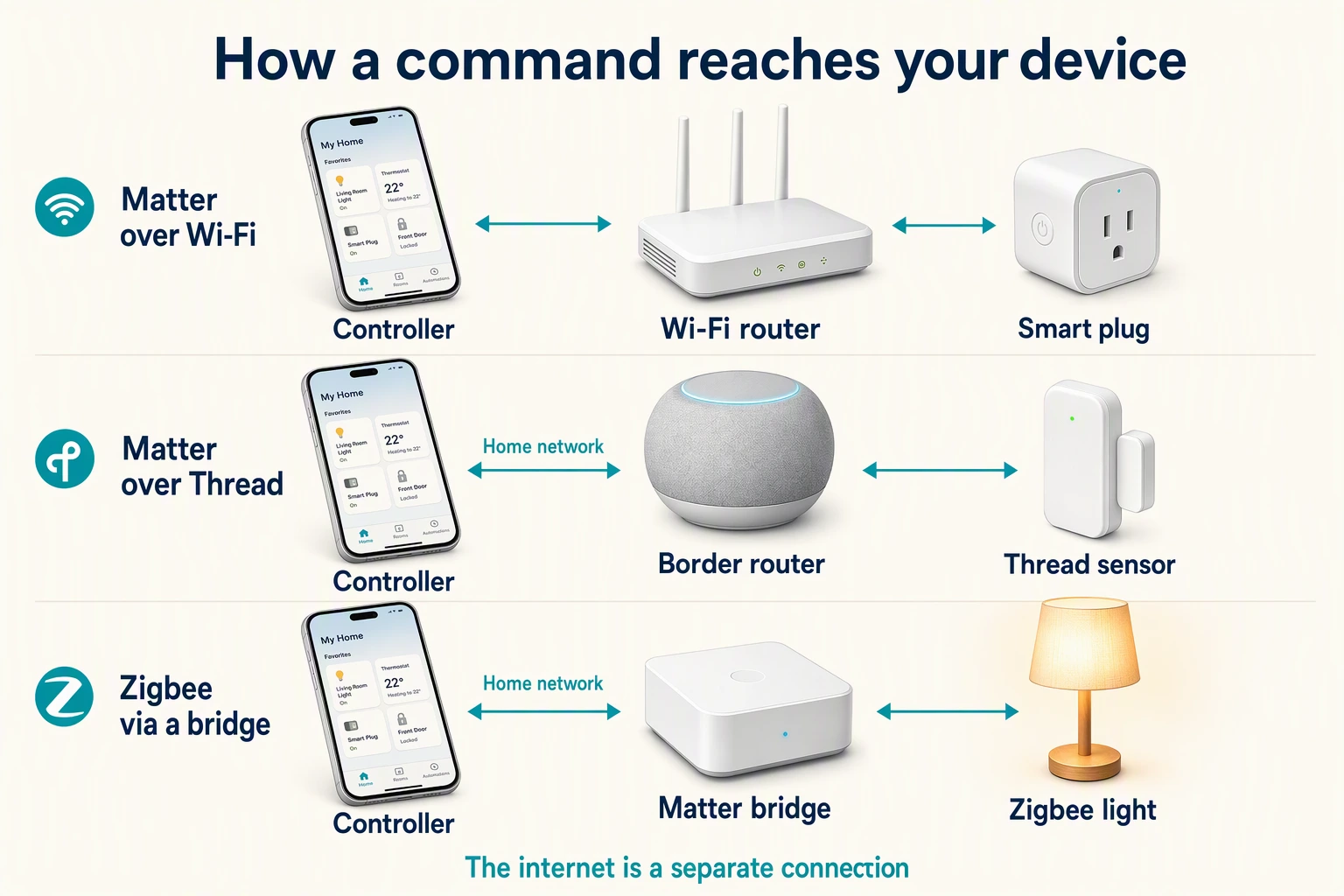
A Matter-over-Wi-Fi device reaches its controller through the home network. A Matter-over-Thread device also uses a Thread border router; a supported Zigbee device uses a compatible Matter bridge. A border router routes IP traffic, while a bridge maps supported functions. Roles can share one box. The necessary links must stay powered and reachable; cloud and remote services add separate dependencies.
Control paths: OpenThread routing and Matter bridge limitations.
Think of your home in three parts: the control app, the connection, and the device.
| Example path | What it means |
|---|---|
| Matter controller ↔ home network ↔ Matter over Wi-Fi plug | The plug uses your Wi-Fi connection and speaks Matter. |
| Matter controller ↔ home network ↔ Thread border router ↔ Thread mesh ↔ Matter sensor | Thread carries the sensor’s messages; the border router links that network to your home network. |
| Matter controller ↔ home network ↔ compatible Matter bridge ↔ Zigbee mesh ↔ Zigbee light | The bridge exposes the supported light and functions to Matter. The light still uses Zigbee. |
Ethernet can also carry Matter traffic. Bluetooth Low Energy is commonly used during setup; it is not the normal operational network in these examples. A border router forwards IP traffic, while a Matter bridge translates supported device functions. CSA Matter FAQ, OpenThread border router guide.
The arrows represent communication paths, not a required number of separate boxes. A single speaker or hub may combine several roles. Thread itself is independent of the application language, so a Thread logo alone does not establish Matter compatibility. Thread Group.
Why Smartify recommends Matter first
For new smart-home purchases, Matter is our default recommendation. When two suitable products meet the same electrical, functional and support requirements, we would choose the Matter-certified one over a proprietary, cloud-only Wi-Fi alternative. We want a home that can grow across brands and work through supported local controls, without making every basic action depend on the original manufacturer’s cloud.
Matter is the interoperability standard we would build around. Apple Home, Google Home, Alexa and SmartThings are ecosystems that support it; Wi-Fi and Thread are connections it can use. That distinction strengthens the recommendation: you can keep Wi-Fi where it makes sense and still insist on Matter.
Why it is a better starting point than proprietary Wi-Fi
A Wi-Fi logo establishes a network connection. It does not establish a shared smart-home language or a local control interface. Matter adds a defined local application protocol and multi-admin device sharing across compatible platforms. That makes it a stronger buying requirement than “has Wi-Fi” or “works with our app”. CSA explains Matter’s local connections and multi-admin.
| Buying question | Proprietary or cloud-only Wi-Fi product | Matter-certified product over Wi-Fi or Thread |
|---|---|---|
| Can basic supported commands stay local? | Depends on the model’s local API; a cloud-only control path requires its service | Matter provides a local control path; the controller and network must remain available |
| Can the device join another platform? | Depends on the vendor’s integrations and continued support | Multi-admin provides a standard way to share the device with compatible platforms |
| How much depends on the original vendor? | Its app or cloud may be essential even for everyday control | Supported Matter controls can use another compatible controller; advanced features, updates or services may still need the vendor |
| Is compatibility evidenced? | A Wi-Fi badge alone says nothing about smart-home feature interoperability | Matter certification is a useful baseline, followed by platform and exact-model checks |
Our preference is fewer avoidable vendor dependencies. A standard local control path gives you more options than a device whose only documented route is one company’s cloud. That is our architectural judgment, not a guarantee that a product will remain supported forever.
There are good non-Matter Wi-Fi products with documented local APIs, so we would not reject a well-supported local solution just because it uses Wi-Fi. Shelly’s documented local HTTP/WebSocket control is one example. Shelly RPC channels. The weaker choice is buying a closed, cloud-only product without checking whether you will still be happy with those dependencies later.
What we would specify today
- For new lights, plugs and controls: start with suitable Matter-certified models, using Wi-Fi or Thread as appropriate. Confirm electrical fit, physical controls, required functions and India support before choosing.
- For new battery sensors: start with suitable Matter-over-Thread options and the required controller, border router and powered mesh coverage. Choose supported Zigbee where it offers a better verified fit or a needed feature.
- For an existing Zigbee home: keep reliable devices. Use a supported bridge where it exposes the functions you need; replacing working hardware just to change a logo is poor value.
- For cameras and specialist equipment: verify the complete feature set. A new Matter device category does not establish that today’s camera, recording service or controller supports every function you need.
Matter-first is a purchasing direction, not a demand to replace everything. We would make a proprietary or cloud-only purchase an explicit exception, with its benefit and dependencies written into the proposal. We would still decline a Matter device that fails the actual home’s electrical, usability or feature requirements.
Compare the jobs they do
| Technology | Its job | Useful starting point | What to check |
|---|---|---|---|
| Wi-Fi | Connects devices to a local IP network through access points | A few powered devices; devices needing more data, such as cameras | Actual Wi-Fi band, coverage, local API or Matter support, and whether the app depends on a cloud service |
| Zigbee | Provides a separate low-power network and device language, commonly using mesh | Sensors, lighting and controls within a compatible hub system | Exact hub/device support, exposed functions and permanently powered routing devices |
| Thread | Provides a low-power IPv6 mesh network | Battery sensors and controls when the chosen products and ecosystem support them | Application language, border-router support and mesh coverage |
| Matter | Defines a common application language across supported IP devices | Sharing supported device functions across compatible ecosystems | Certification, transport, controller support and the exact functions available |
These are different technical jobs. Our purchasing preference is Matter-first wherever the actual product and platform meet the brief. Wi-Fi, Zigbee and Thread can coexist in one installation. A camera and a battery contact sensor have different communication needs. Zigbee’s low-power mesh design and Thread’s IP mesh design are described by their standards bodies. CSA Zigbee, Thread Group. For a broader comparison, see all home automation protocols.
Understand what each box does
Wi-Fi router or access point: connects Wi-Fi devices to the home network. The broadband connection is a separate link; losing the internet is not the same as switching off the router.
Zigbee coordinator: forms a Zigbee network. In a typical consumer installation it sits inside a hub or attaches to a local automation computer. Zigbee routers relay traffic; end devices communicate through a parent. Home Assistant ZHA documentation.
Matter controller: controls devices using Matter. This is a role, not necessarily a dedicated box. Check the ecosystem’s requirements for commissioning, ongoing control and automations. Home Assistant, for example, can be a Matter controller without acting as a Matter bridge. Home Assistant Matter documentation.
Thread border router: routes traffic between Thread and other IP networks such as Wi-Fi or Ethernet. It is not automatically a Matter controller or a Zigbee hub. OpenThread border router guide.
Matter bridge: makes supported devices on another system available to Matter. A bridge does not promise that every device or every feature will appear. Home Assistant bridge guidance.
Hub: an umbrella product name. Before buying one, ask which of these roles it actually provides, for your exact model and firmware.
Will it work when the internet goes down?
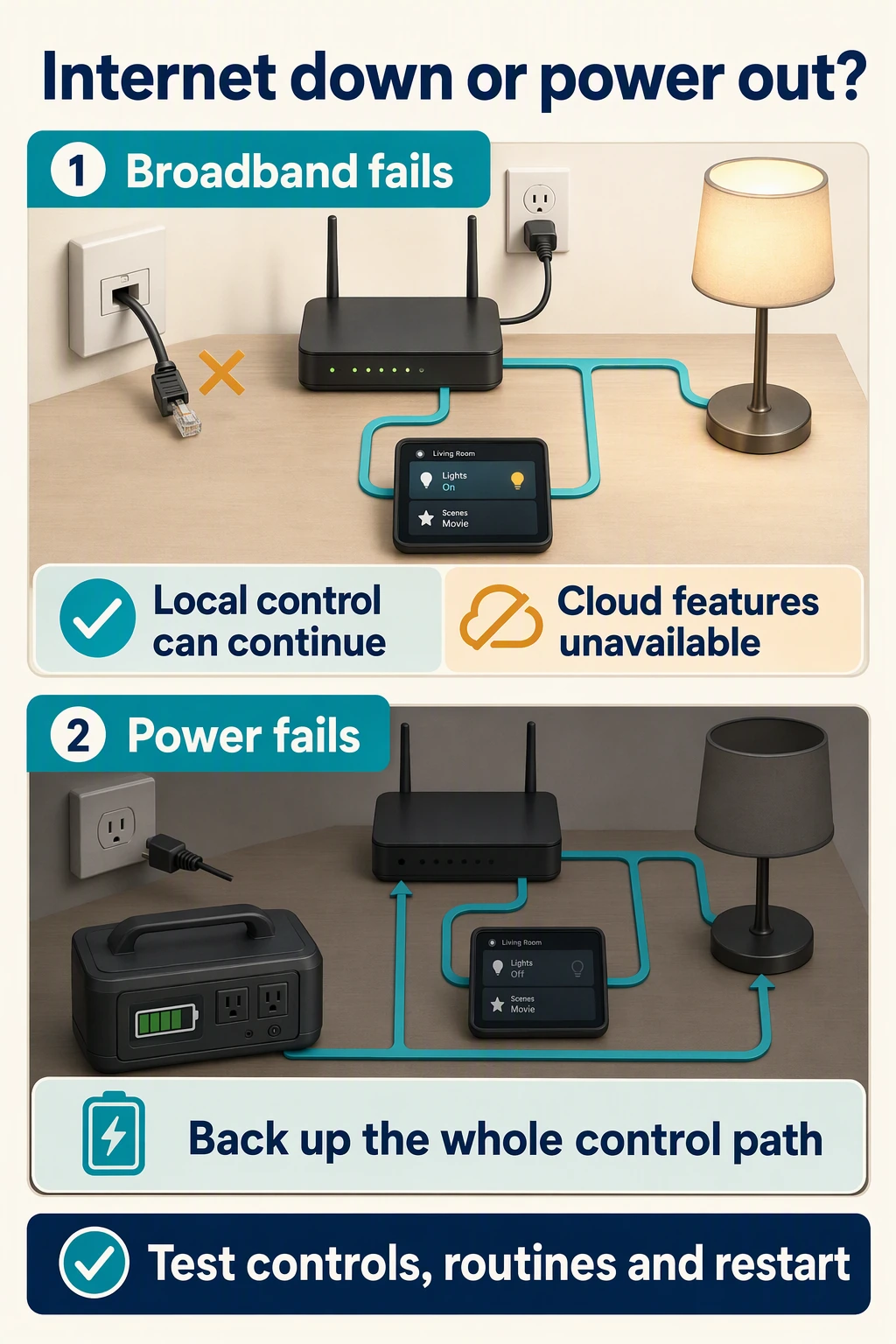
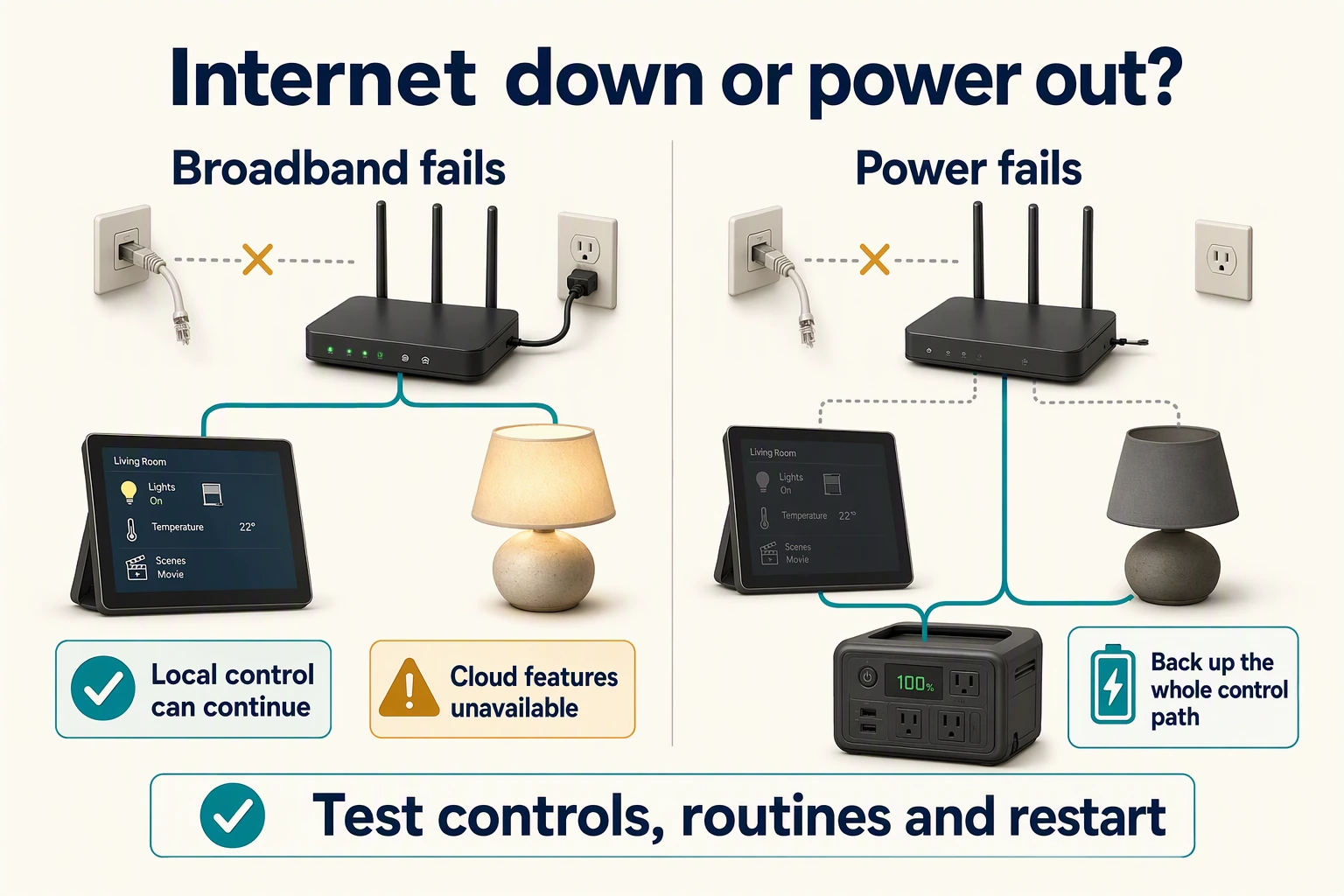
When broadband fails, local commands and routines can continue only if their complete control path still works. Cloud-only functions cannot reach their service. When power fails, only powered or backed-up equipment can work: include the controller, network, routing devices and controlled load in the backup plan. Test wall controls, app commands, routines and power restoration separately.
Local versus cloud operation: Home Assistant offline FAQ. Backup checklist is installation-planning guidance.
Wi-Fi does not inherently require a cloud service. Wi-Fi devices can offer local control; Matter is one route, and vendor local APIs are another. Shelly, for example, documents local HTTP/WebSocket APIs separately from optional cloud connections. That is evidence about supported Shelly devices, not a promise about every Wi-Fi product. Shelly RPC channels, Shelly cloud configuration.
A local automation can keep running if its controller, devices and necessary network connections remain powered and reachable. A cloud-only integration cannot reach its cloud during an internet outage. Remote access, notifications and voice services may have their own internet requirements. Home Assistant offline operation.
Use this practical outage checklist when reviewing a proposed installation:
| What fails? | What to verify in your home |
|---|---|
| Broadband only | Wall controls, local app commands and locally stored automations; separately test voice and remote services |
| Wi-Fi access point or LAN | Which control paths use it, even when the end device itself uses Thread or Zigbee |
| Automation hub or controller | Which routines stop; whether direct local switch inputs still control their loads |
| Mains power | Which devices and network links have backup, and whether the controlled lights or appliances have power |
| Power returns | Whether each load restores off, on or its previous state; whether the network and routines recover correctly |
This table is a test plan, not a protocol guarantee. A UPS on the broadband router alone does not power an unbacked hub, Thread border router, mesh repeater or light circuit. Plan backup around the complete path needed for the function you want to retain.
Ask for a demonstration: disconnect the internet link while leaving the local network powered. Test each promised offline function. Then test controller loss and power restoration separately with the installer. For hardwired equipment, let the installer perform any electrical isolation.
Mesh needs powered paths
In a mesh, routing devices relay messages for other devices. Sleepy battery end devices conserve energy and do not relay general network traffic. Adding contact sensors therefore does not automatically extend a network across rooms. Thread distinguishes routers or mesh extenders from end devices; product capability determines which role a device can take. OpenThread node roles.
For Zigbee, many mains-powered plugs and lamps act as routers, but not every powered product does. A lamp used as a router becomes unavailable when its wall switch cuts power. Plan dependable, always-powered routing points and confirm their role in the product documentation. Home Assistant ZHA mesh guidance.
Do not buy from a universal “devices per hub” or “range through walls” number. Coverage and usable capacity depend on the actual hardware, firmware, placement, routing paths and building. For a finished Indian apartment, test the far bedroom, balcony door and any device behind a metal switch plate. For a villa, check each floor and the stairwell rather than assuming a mesh will reach everywhere.
Plan for shared radio space
Thread and common 2.4 GHz Zigbee installations share spectrum with 2.4 GHz Wi-Fi. They form different networks, but can still interfere. Physical separation and suitable channel choices can improve coexistence. Silicon Labs coexistence fundamentals.
For installation planning, keep radio hardware out of metal cabinets where possible, avoid stacking separate radio hubs directly against an access point, and assess congestion in the actual home. Let the installer coordinate channel changes with device support and recovery procedures. Moving compatible high-traffic Wi-Fi clients to another supported band can reduce 2.4 GHz demand; it does not turn a 2.4 GHz-only switch into a 5 GHz device. There is no single best channel for every apartment.
Choose for your Indian home
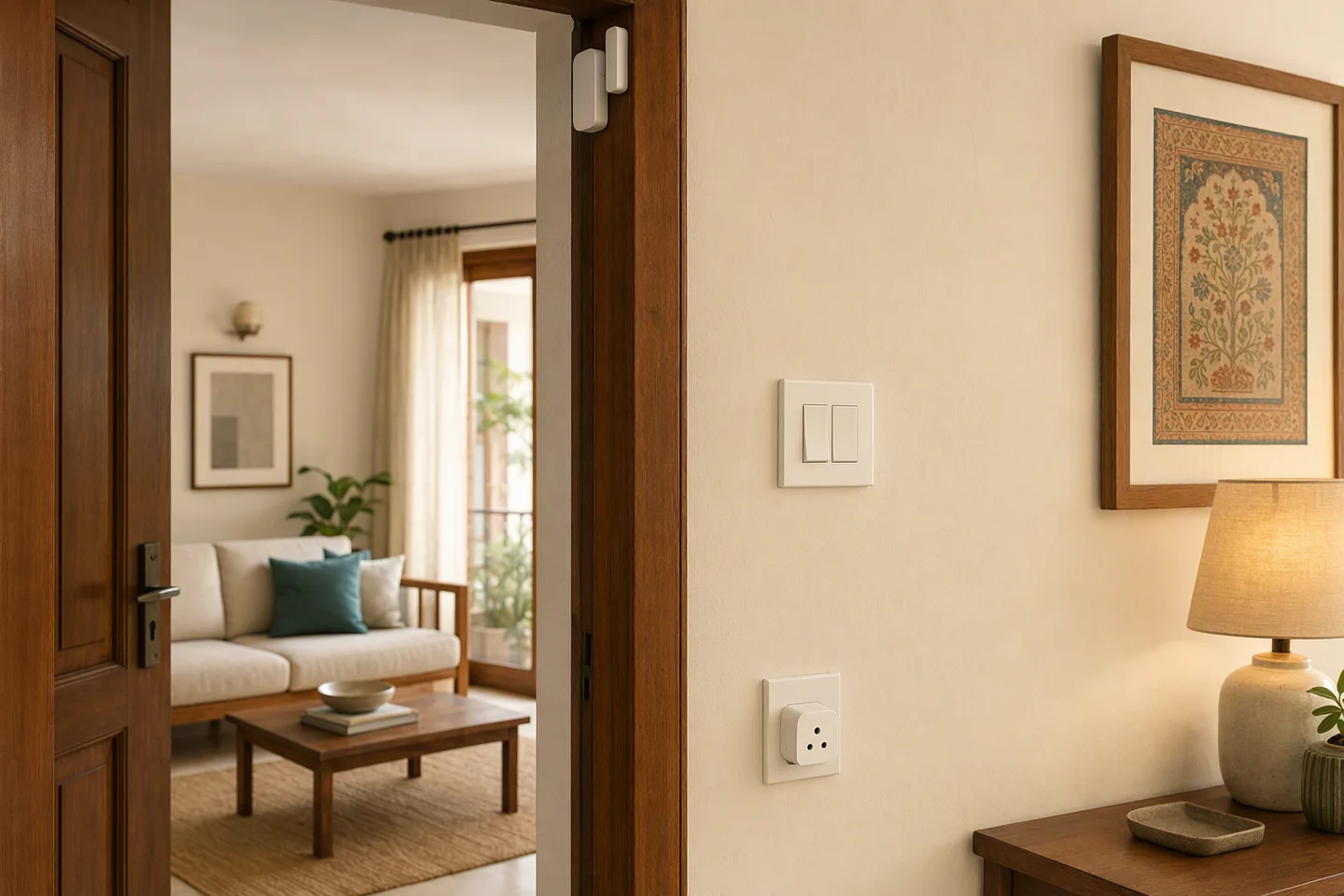
A finished apartment or rented home
Start with one useful room or function. For a few powered devices, our first shortlist would be suitable Matter-over-Wi-Fi products with good coverage and the required controls. A proprietary Wi-Fi model should earn its place through a specific benefit, not simply a lower headline price. For a collection of battery sensors, start with compatible Matter-over-Thread options and compare supported Zigbee where features, availability or the existing installation make it a better fit. Include the required hub or border router.
Before any retrofit, ask an electrician to check neutral availability, back-box space, load type and rating, and how the existing wall switch connects. A protocol label cannot tell you whether a relay fits behind your switchboard, a dimmer matches your LED driver, or a fan controller suits your particular fan. For a rental, favour a plan that can be removed and restored with the owner’s agreement.
A renovation or new build
Decide physical controls and wiring provisions before finishing the walls. Plan access-point locations, Ethernet where useful, accessible control equipment, and backup circuits. Compare wireless and wired approaches for the whole project; this four-technology guide is not an argument against a suitable wired design.
Document what each wall control does when the network or controller is unavailable. A wired local input and a battery scene button can look equally simple on the wall while depending on very different control paths. Retain a control method the household can use without a phone, and test it rather than relying on the word “manual”.
An existing smart home
Keep devices that already meet your needs. Check whether your existing hub can bridge the functions you want, and whether the destination ecosystem exposes them. Matter support does not require replacing every working Zigbee product. Conversely, sharing a device through Matter does not necessarily reproduce every feature of its manufacturer’s app. Google explicitly distinguishes supported device types and available control methods. Google Home device support.
Follow this decision tree
- Do you already own working devices? If yes, check their exact hub, local integrations and bridge options first. If no, choose a Matter-capable control ecosystem your household wants to use and shortlist suitable Matter-certified devices first.
- Is the device a camera or another high-data device? Compare suitable Wi-Fi or Ethernet models, including recording and outage behaviour. Check Matter support separately; the label alone does not establish camera features.
- Is battery operation central to the job? Start with suitable Matter-over-Thread devices; choose compatible Zigbee where it better meets a verified requirement or extends a supported existing home. Include the hub or controller, border router and routing coverage in the decision.
- Is it a powered switch, plug or light? Prefer a suitable Matter-certified model over a proprietary or cloud-only alternative; then choose Wi-Fi or Thread to fit the job. Wiring fit, load compatibility, physical control and support matter as much as the radio.
- Do you want the same device in more than one ecosystem? Check Matter certification and multi-admin support for the intended combination, then verify the features visible in each app.
- Must the function survive broadband failure? Require a demonstrated local control path and locally executing routine. Specify backup separately if it must survive a power cut.
The result may be a mixed home: cameras on Wi-Fi or Ethernet, low-power sensors on Zigbee or Thread, and Matter for supported cross-platform control. Make Matter the preferred interoperability layer for new purchases, and pick each connection for its job.
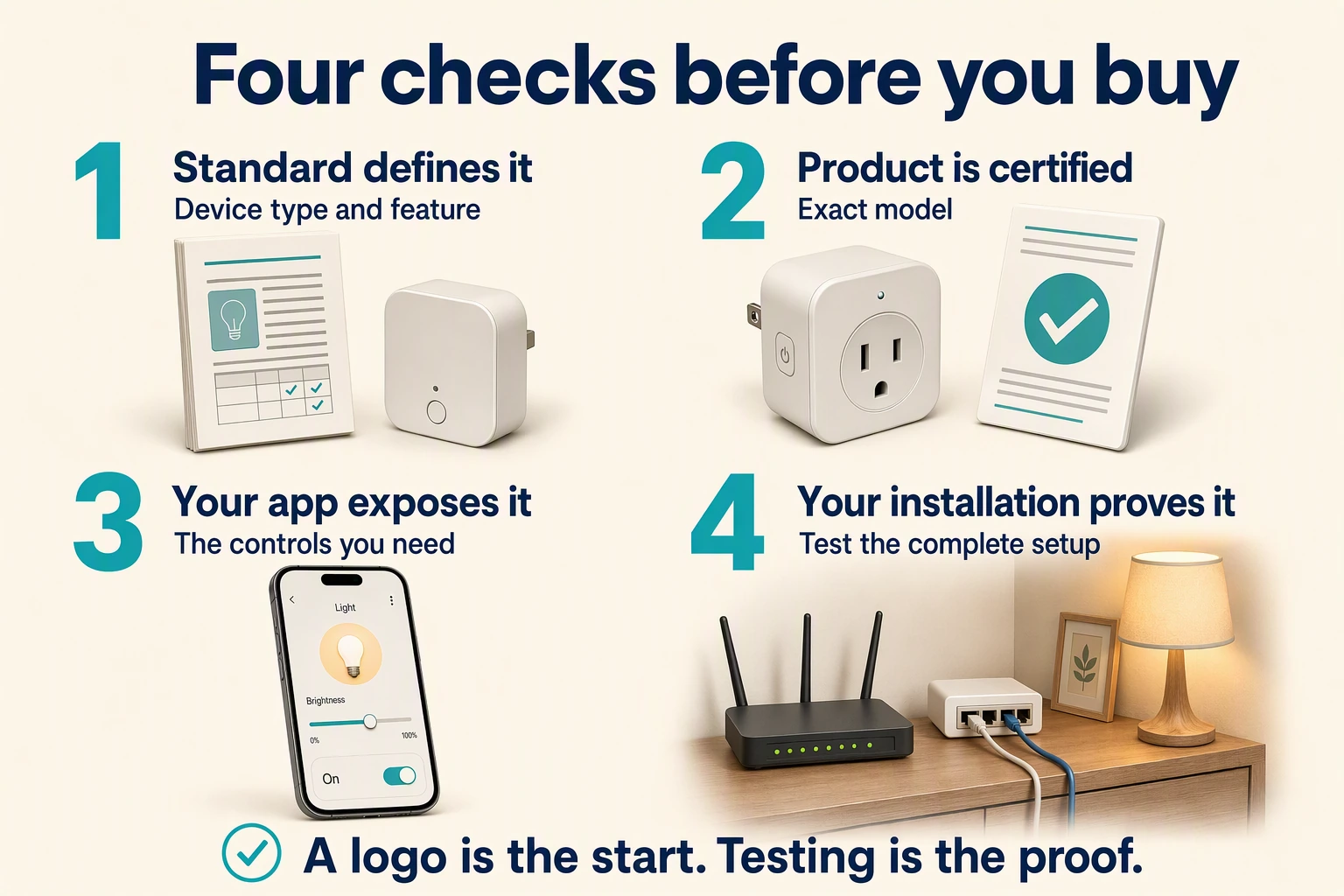
Check compatibility at four levels
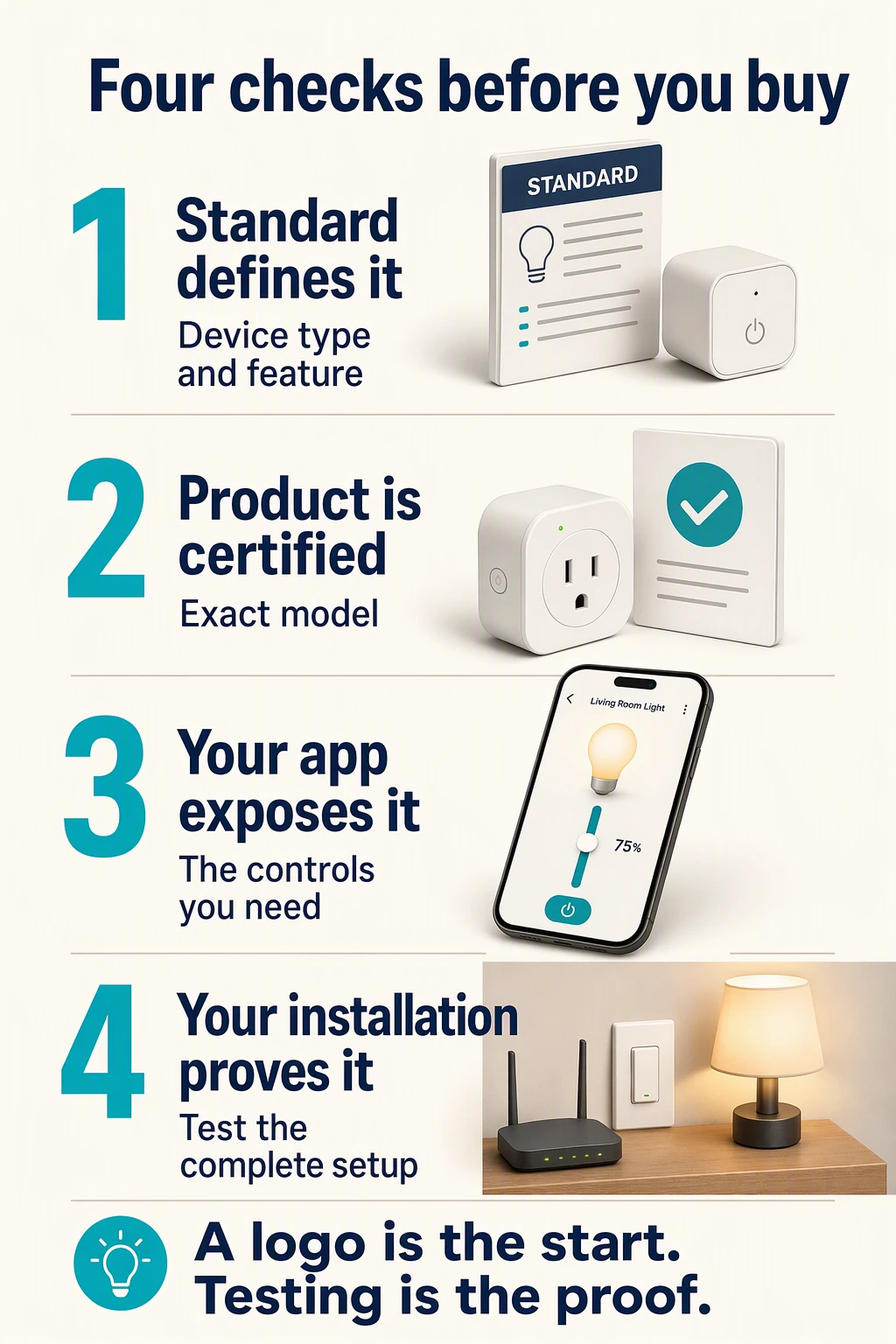
Check all four before buying: the standard must define the device type or feature; the exact model must match its certification claim; your chosen app must expose the controls you need; and your complete installation must pass practical tests. Certification alone does not guarantee every app feature or installation outcome.
| Level | The question to ask | Evidence to request |
|---|---|---|
| Standard | Does the specification define this device type and feature? | Relevant standards release or specification |
| Certified product | Is this exact product certified for the claimed standard? | Model-matched entry in the CSA certified product database |
| Ecosystem | Does my chosen app expose the controls I need? | Current platform support documentation |
| Tested installation | Does this hardware and firmware combination work as promised? | Demonstration and a recorded acceptance checklist |
Certification is useful evidence, but it is not a substitute for checking what your chosen platform exposes. Google’s Matter support matrix, for example, distinguishes app, voice and display support. Google Home device support.
Matter continues to evolve: CSA announced Matter 1.5 on 20 November 2025, adding cameras, among other capabilities; it announced Matter 1.6 on 17 June 2026. A feature entering a specification does not prove that a particular product or ecosystem has implemented it. Matter 1.5 announcement, Matter 1.6 announcement.
The news behind our Matter-first recommendation
Selected primary announcements, checked on 17 October 2026. These show platform adoption and product investment; they do not establish identical features in every ecosystem or availability of every product in India.
17 June 2026 — CSA announces Matter 1.6
Connectivity Standards Alliance Kicks Off Unify, Where the IoT Industry Decides What Comes Next
CSA announced Matter 1.6 at Unify, continuing development of the standard. This supports our view that Matter is receiving ongoing industry investment. It does not mean an installed device or controller automatically acquires the release’s capabilities.
20 November 2025 — Matter expands to cameras and more categories
Matter 1.5 Introduces Cameras, Closures, and Enhanced Energy Management Capabilities
CSA added camera support and other capabilities to the specification. The significance is broader scope for interoperable devices; actual camera support, recording features and ecosystem availability still need model-by-model confirmation.
6 November 2025 — IKEA commits a new product range to Matter
IKEA launches new smart home range with 21 Matter-compatible products
IKEA announced 21 products across lighting, sensors and controls, describing a rebuild of its smart-home range around Matter. This is concrete manufacturer investment beyond a standards announcement. It is not proof that every announced model is sold or supported in India.
2 May 2023 — Alexa adds Matter over Thread and iOS setup
Alexa adds iOS Setup, Thread support, and surpasses 100 million Matter-enabled Echos
Amazon announced iOS setup for Matter devices and Thread border-router support on Echo (4th Gen), alongside additional controller updates. This demonstrates an operational route into Alexa for supported Matter-over-Thread devices. Check the exact Echo model and current supported device types; the announcement is not a promise about every Echo.
18 January 2023 — Apple includes Matter in HomePod
Apple introduces the new HomePod with breakthrough sound and intelligence
Apple explicitly described HomePod connecting to and controlling Matter accessories. Matter therefore has a place in Apple’s home platform, alongside its other integrations. This does not mean every manufacturer’s advanced controls appear in Apple Home.
15 December 2022 — Google enables Matter on Nest and Android
Matter is now available on Google Nest and Android devices
Google announced Matter setup and control on supported Nest and Android devices, including Thread border-router updates for specified Nest hardware. This demonstrates support across a major platform’s phones and home equipment. Use Google’s current device-type matrix to check present-day functions rather than treating a launch article as a compatibility list.
25 October 2022 — Samsung launches Matter control in SmartThings
Samsung Electronics Launches Matter Functionality, Ushering a New Era of Interoperability
Samsung’s Global Newsroom announced Matter functionality in SmartThings and hub/app updates. It is evidence that Matter is supported by another major controller ecosystem. Required hardware, firmware and available controls still depend on the installation.
Our conclusion: Matter has support from the major consumer control platforms, continued standards development and investment from device manufacturers. That is why we prefer it for new purchases. The test before buying remains the same: the certified model must expose the functions you need in your chosen app and pass the installation checks. Google’s current Matter support matrix documents differences between device types and control methods.
Independent reporting to read alongside the announcements
- 6 November 2025 — WIRED: Ikea’s Smart Home Reset Goes Back to Basics. Reporting on IKEA’s product strategy and the distance still to travel toward a seamless smart home. It adds industry context, not a universal compatibility verdict.
- 20 November 2025 — MacRumors: Matter 1.5 Launches With Camera Support. A contemporary account of the release; use the CSA announcement above and current platform documentation for technical scope and buying decisions.
Questions homeowners ask
Is Matter better than Wi-Fi?
For a new purchase, we prefer a suitable Matter-certified device over a proprietary, cloud-only Wi-Fi device. Matter adds a shared local control language and cross-platform device sharing; Wi-Fi alone does not. But Matter can run over Wi-Fi, so the advantage is the interoperability layer, not a replacement radio. Some non-Matter Wi-Fi devices also offer good local APIs.
Does every Thread device support Matter?
No. Thread provides an IP network and can carry different application protocols. Check for Matter support on the exact device. Thread Group.
Do I need a hub for Matter?
You need a suitable way to commission and control the device. Matter over Thread also needs a border-router path for communication with the wider home network. Several roles can share one product, so check what equipment you already own. OpenThread.
Will my old Zigbee sensors work with a Matter hub?
Only if there is a supported integration path, such as a compatible Matter bridge exposing those sensors. A Matter controller alone does not add a Zigbee radio or universal Zigbee compatibility. CSA Matter FAQ.
Can I use Alexa, Google Home and Apple Home together?
Matter multi-admin enables sharing supported devices across ecosystems. Check the actual controllers and features in each ecosystem; sharing a device does not imply that routines or manufacturer-specific settings transfer too. CSA Matter FAQ.
Will the wall switch work without internet?
That depends on the product and wiring. Ask whether it directly controls the local load or sends a scene command elsewhere, then test the promised behaviour. The radio logo cannot answer this.
Will more sensors improve mesh coverage?
Sleepy end devices do not relay traffic. Add suitable powered routing devices where needed, and verify coverage in the finished home. OpenThread node roles.
Does Matter need an IPv6 internet connection?
Matter uses local IPv6 networking. That does not mean the ISP must provide IPv6 internet service. Network isolation or blocked discovery traffic can still cause problems; follow the controller’s network guidance. Home Assistant Matter network requirements.
Which is cheapest for my flat?
Compare the complete installed quote: devices, controllers, hubs, border routers, access points, electrical work, backup and ongoing service. A low device price may exclude equipment needed to achieve your intended control and reliability.
Before you approve an installation
Ask for a room-by-room device list with exact model numbers, firmware requirements, control roles, local and cloud dependencies, wall-switch behaviour and a power-restoration test. Keep the setup codes and a record of account ownership. Those details will be more useful during future changes than a single protocol logo.
Explore the individual guides: Wi-Fi, Zigbee, Thread and Matter.