Wi-Fi, Zigbee, Thread and Matter: A Visual Guide for Indian Homes
Wi-Fi, Zigbee, Thread and Matter do different jobs. Learn what each one does, what hubs and border routers are for, and how to plan a mixed home that keeps working when broadband fails.
By Abhi Bavishi, Founder, Smartify
Technical review pending
At a glance
You will learn
- Tell Wi-Fi, Zigbee, Thread and Matter apart: network, mesh and device language
- Know what a border router, a bridge and a controller each do
- Plan which functions must keep working without the internet
You need
- No smart-home experience
Key takeaway
Wi-Fi and Thread are network connections, Zigbee is its own network, and Matter is a common language over IP networks, so choose by what the home needs, not by the logo.
Key terms in this lesson (1)
- Border router
- Forwards traffic between a Thread mesh and your Wi-Fi or Ethernet network. It is not automatically a Matter controller or a bridge.
Short answer: Wi-Fi and Thread provide network connections. Zigbee is a separate low-power mesh with its own device language. Matter is a common application language over Wi-Fi, Ethernet or Thread. Zigbee reaches Matter through a compatible bridge.
Choose for the job and the household, not the logo. Cameras and battery door sensors have different needs, so one home can use several networks.
See how the connections fit together
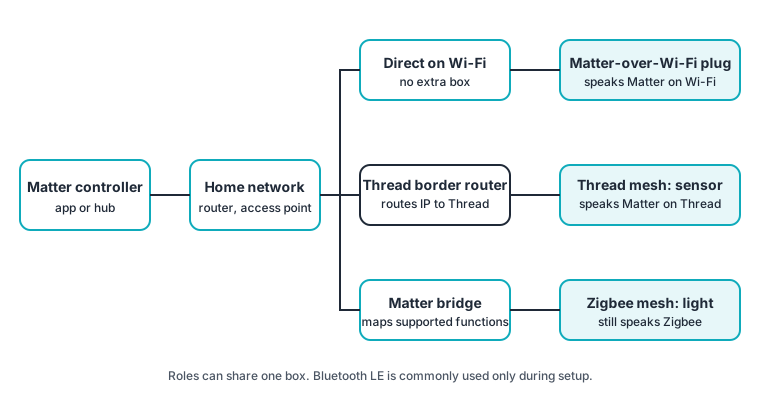
A Matter-over-Wi-Fi plug uses the home network directly. A Matter-over-Thread sensor needs a Thread border router between its mesh and that network. A bridged Zigbee light still uses Zigbee; the bridge exposes its supported functions.
Matter commonly uses Bluetooth Low Energy for setup, not everyday control in these paths. Thread can carry other application languages, so its logo alone does not prove Matter support.
Compare the jobs they do
| Technology | Job | Check |
|---|---|---|
| Wi-Fi | Local IP network; suits powered/high-data devices | Band, coverage, local-control support and cloud needs |
| Zigbee | Low-power mesh plus device language | Exact hub support and always-powered routing paths |
| Thread | Low-power IPv6 mesh | Application language, border router and coverage |
| Matter | Shared application language across supported IP devices | Certification, controller and actual app features |
These are starting points, not rankings. See all protocols for the wider comparison.
What each box actually does
- A Wi-Fi router/access point connects local devices. Broadband is a separate link.
- A Zigbee coordinator forms the mesh; routers relay and end devices use a parent.
- A Matter controller commissions and controls devices. It is a role, not necessarily a dedicated box.
- A Thread border router forwards IP traffic to/from Wi-Fi or Ethernet. It is not automatically a controller or Zigbee hub.
- A Matter bridge exposes selected functions from another system. Scenes available in the native app may be missing.
“Hub” is a marketing label: check which roles the exact model provides. Matter multi-admin can share a device with compatible apps; test the functions each exposes.
Will it work when the internet goes down?
Wi-Fi does not inherently require cloud control. Some products document local HTTP/WebSocket control separately from optional cloud service; this is product-specific evidence.
Trace the whole function: device, network, controller, power and where automation logic runs. Home Assistant documents offline operation for locally connected devices in its own system, while cloud-only devices stop. Other systems need their own tests; voice, notifications and remote access can have separate internet dependencies.
Ask the installer to disconnect broadband with the local network powered and demonstrate promised functions. Then separately test access-point loss, hub loss, mains failure and power restoration. Which wall controls survive, which routines stop, and do loads return off, on or in their previous state?
A UPS on the router alone does not power an unbacked hub, border router or light circuit. Backup must cover the whole required path.
Mesh needs powered paths
Routers or Thread mesh extenders forward messages. Sleeping battery end devices attach to a parent and do not relay, so more sensors do not extend coverage. Most powered Zigbee plugs and many bulbs route, but check the model. A bulb switched off at the wall stops routing.
Plan routing points that remain powered. Test far rooms, balcony doors, metal obstructions, each floor and stairs. Hardware, firmware and construction prevent any universal device-count or range promise.
Plan for shared radio space
Thread, most Zigbee systems and 2.4 GHz Wi-Fi share spectrum. Physical separation helps coexistence: avoid metal cabinets and stacking hubs on access points. Check congestion on site. Move capable Wi-Fi equipment to 5 GHz where appropriate; 2.4 GHz-only devices still need their supported band. See Zigbee network design.
How to choose: questions to ask about your home
Agree offline needs, power source, household apps, existing devices, cross-app sharing and who maintains added boxes. Ask what happens if a vendor service closes. Put the answers in the quote.
For a finished flat, start with one useful room and have an electrician check neutral, box depth and load compatibility. For a new build, plan controls, wiring, Ethernet and backup before finishes; compare KNX and KNX versus Zigbee. Keep working existing devices where suitable.
Check compatibility at four levels
Check the specification’s feature, the exact model’s certification, the chosen app’s support, and a live installation test. Certification does not replace ecosystem or on-site verification. Google’s support table distinguishes voice, app and display support.
Common questions
Old Zigbee sensors in Matter? Use a supported bridge; a controller alone adds no Zigbee radio.
IPv6 internet required? No: Matter needs local IPv6. VLANs and multicast filtering can break discovery.
Before you approve an installation
Keep room-by-room models, firmware, control roles, dependencies, wall-control behaviour, restore tests, setup codes and account ownership in the handover record.
Where to go next
Check yourself.
Questions from real jobs. Think first, open the answer, then say how you did. The score is for you and stays on this device.
A Thread sensor has a Thread logo. Can you assume it speaks Matter?
No. Thread can carry other application languages too, so look for the Matter logo as well.
A client has Zigbee lights and wants them in a Matter app. What do you need?
A compatible Matter bridge. A Matter controller alone does not add a Zigbee radio.
Sources
- CSA: Matter FAQ
- CSA: Zigbee overview
- Thread Group: Thread benefits
- OpenThread: node roles and types
- OpenThread: border router guide
- Home Assistant: ZHA (Zigbee) integration
- Home Assistant: Matter integration
- Home Assistant: does it work without internet?
- Silicon Labs: multiprotocol Wi-Fi coexistence fundamentals
- Google Home: supported Matter device types
- Shelly API docs: RPC channels
- CSA: certified products database