 TP-Link
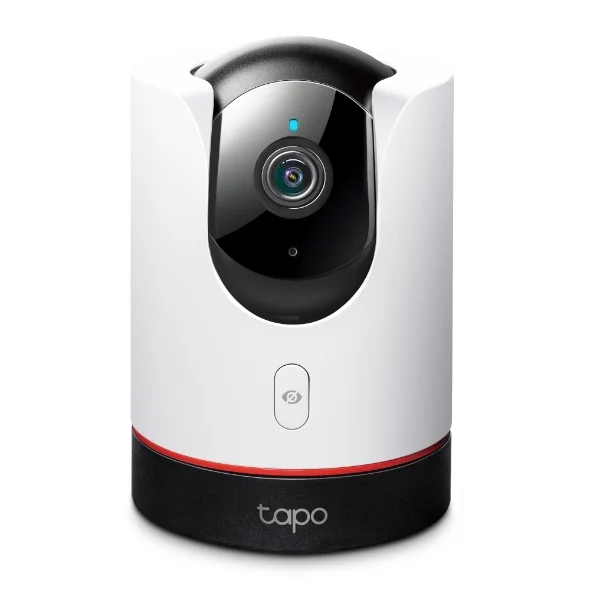
 TP-Link Tapo C225 Security Camera
Key features
Check the room. Keep control of your privacy. Tapo C225 gives you a moving view of an indoor space and follows detected activity. A physical privacy shield lets you conceal the lens when monitoring is not needed. View live video and manage recording through the Tapo app.
Genuine Product
100% Authentic
Warranty
Confirmed with quote
Availability
Enquire before ordering
Expert Support
Mon-Sat Support
Product Description
TP-Link Tapo C225 Security Camera
Tapo C225 is an indoor pan-and-tilt camera for checking a living room, entrance hall or another indoor space from your phone. Its 2K QHD image and motion tracking help keep activity in view. When you want privacy, close the physical lens shield using the camera control or the app.
A flexible view of an indoor room
Pan-and-tilt movement helps the C225 cover different parts of a room from one mounting position. It can be useful for checking a lounge, an indoor entrance or a pet’s usual area while you are elsewhere. Motion tracking can follow detected activity, but the camera still needs a clear line of sight. Furniture, walls and the chosen mounting height determine what can actually be seen.
Privacy has a physical control
The C225’s privacy shield conceals the lens when monitoring is not wanted. This gives the household a visible way to understand when the camera’s view is closed. Decide when to use monitoring and who should have app access during initial setup. For a shared living room, a clear household routine can be more useful than leaving every notification and recording option enabled by default.
Balance useful alerts with recording needs
Detection and tracking help draw attention to activity, while recording lets you review it later. Configure the camera around the area that matters rather than pointing it at a constantly busy background. Then choose between a suitable microSD card and optional Tapo Care cloud storage. The right choice depends on how you want to review events and whether a recurring storage subscription suits your household.
Choose a position that works day and night
Check the view in daylight and after dark before committing to a wall or shelf position. Avoid placing the lens immediately behind reflective glass if that compromises the intended view. Leave a safe route for the power cable and verify Wi-Fi reception at the final location. If you are replacing an older camera, confirm its power arrangement rather than assuming that the existing adapter is appropriate for the C225.
Key features
- 2K QHD video and pan-and-tilt coverage
- Physical privacy shield
- AI detection and motion tracking
- Local microSD recording or optional Tapo Care cloud storage
Compatibility and installation
Install indoors with access to power and a suitable Wi-Fi connection. A microSD card is purchased separately, and cloud recording requires a separate subscription. The referenced India V2 page specifies support for cards up to 512 GB; confirm the hardware revision before selecting storage. Setup screens and features can differ between revisions and firmware. Position the camera to cover your own indoor space and check the view during commissioning.
Frequently asked questions
Is the C225 an outdoor camera?
This listing is for an indoor camera. Use it in a suitable indoor position. If the installation is exposed to rain, dust or outdoor conditions, ask for an outdoor model with an appropriate environmental rating instead.
Can I use it without a cloud subscription?
The camera supports local microSD recording as an alternative to paid Tapo Care storage. A suitable card is separate. Remote app features still depend on the required network and account setup; local storage does not mean every feature is internet-independent.
What card capacity does it support?
The referenced India V2 page specifies microSD support up to 512 GB. Confirm the exact hardware revision before buying a card, because specifications and available features can differ between revisions.
Does closing the privacy shield remove old recordings?
Closing the shield conceals the lens; it should not be treated as a way to erase previously stored footage. Manage stored recordings and account permissions separately through the relevant app or storage controls.
Availability and enquiries
Out of stock at Smartify. Enquire to register your interest or discuss an available alternative. Availability, price, regional version and warranty will be confirmed before any order; no restock date is promised.
Tell Smartify which room you want to monitor and whether you prefer local or cloud recording.
Product video
TP-Link C225 unboxing and setup; hardware revisions may differ
Professional Installation Available In
Get expert installation for TP-Link Tapo C225 Security Camera in these cities with certified technicians and comprehensive warranty support.
Don't see your city? We're expanding! Contact us to check availability in your area or view all service locations.
Need Help Choosing?
Our smart home experts can help you find the perfect products for your home.