 Aqara
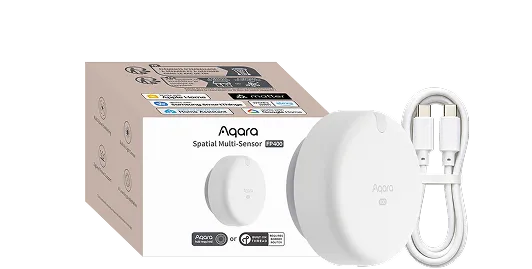
Aqara Spatial Multi-Sensor FP400
Key features
Different parts of a room can respond differently. Aqara FP400 uses radar to sense presence and location without a camera. With the right setup, a sofa and dining area can become separate automation zones. Plan its mounting, power and platform together to get the room behaviour you need.
Genuine Product
100% Authentic
Warranty
Confirmed with quote
Availability
Enquire before ordering
Expert Support
Mon-Sat Support
Product Description
Aqara Spatial Multi-Sensor FP400
Aqara Spatial Multi-Sensor FP400 is a continuously powered radar sensor for room-level occupancy and spatial automations. It is worth assessing for shared living spaces where the behaviour at a desk, sofa or dining table should differ. Its camera-free sensing supplies occupancy information rather than a visual recording of the room.
Start with the way the room is used
Sketch the furniture and the areas where people spend time before deciding on zones. Give each zone a specific purpose, such as a task-light routine, and avoid creating unnecessary divisions. Test people entering, sitting and moving between areas. The most useful layout is one that follows everyday activity and remains understandable when furniture changes.
Key features and specifications
- 60 GHz mmWave sensing; up to ten people tracked
- Up to eight configured custom zones
- 120° field of view and ambient light sensing
- Zigbee or Matter-over-Thread connectivity
- USB-C power input: 5 V, 1 A
Compatibility and setup requirements
Custom zones require setup through Aqara Home. A compatible Aqara hub gives access to the fuller spatial feature set; supported examples include M3, M100, M200 and G410, subject to region and firmware. Aqara also documents an Aqara Home setup route using a preconfigured compatible third-party Thread border router. Confirm its supported functions for the intended platform.
Direct third-party Matter setup without Aqara Home is limited to one whole-area occupancy sensor and does not provide custom zones. Sharing configured capabilities through Matter does not expose every Aqara feature. Check the desired entities and controls before choosing the connection route.
Allow time for commissioning after mounting. Check the actual detection boundaries and the absence delay before letting occupancy switch lights off. Keep manual lighting controls accessible, especially while refining routines. Plan the cable route early so the chosen sensor position is practical to power and service.
Frequently asked questions
Will any older Aqara hub work?
No. Aqara lists several older hubs, including M2 and E1, as unsupported for this product. Verify the exact hub and firmware rather than buying by brand alone.
Is it a battery-operated alternative to FP300?
No. FP400 requires continuous USB-C power. The power arrangement is a key part of the installation choice.
What helps Smartify assess a room?
Send a floor plan, mounting options, ceiling height and the actions wanted in each area, together with details of your existing hub and platform.
Availability and enquiries
Out of stock at Smartify. Enquire to register your interest or discuss an available alternative. Availability, price, regional version and warranty will be confirmed before any order; no restock date is promised.
Specifications
- Brand
- Aqara
- Category
- Sensors
- SKU
- ENQ-AQARA-SPATIAL-MULTI-SENSOR-FP400
- Model
- FP400
- Detection
- 60 GHz mmWave
- Custom zones
- Up to 8; Aqara Home setup required
- Power
- USB-C 5 V 1 A
- Connectivity
- Zigbee or Matter over Thread
- Direct Matter setup
- Whole-area occupancy only; no custom zones
- Availability
- Out of stock
- Warranty
- Manufacturer warranty
Professional Installation Available In
Get expert installation for Aqara Spatial Multi-Sensor FP400 in these cities with certified technicians and comprehensive warranty support.
Don't see your city? We're expanding! Contact us to check availability in your area or view all service locations.
Need Help Choosing?
Our smart home experts can help you find the perfect products for your home.